Stock & Inventory Simple:StoDo
- 4.7
- Rating
- 1.00M
- Installs
- Free
- Price

 Analysis by App-foxy
I tried Stock & Inventory Simple:StoDo with a very ordinary problem in mind: keeping track of items without turning a small shop, storeroom, or household supply cupboard into a second job. The app is aimed at business users, but its straightforward approach also makes sense for anyone who needs a practical inventory record rather than a full retail platform. My overall impression is that it succeeds when the main task is counting what comes in, what goes out, and what remains.
It is a free inventory app from Chester Software (Xaltos Technologies Ltd), with an average rating of 4.7 from around 23 thousand ratings and more than a million installs. Those figures suggest that its simple approach has found a broad audience. It is rated for Everyone, so the presentation is accessible rather than technical, and the current version is 2.1.51. I would describe it as a useful stock notebook with digital conveniences, not as a complete replacement for accounting, point-of-sale, or enterprise warehouse software.
From an untidy stockroom to a usable record
The best way to understand this app is to imagine a small operation before using it. A shop owner may have boxes arriving from different suppliers, products being sold during the day, and occasional items moved between a back room and the sales area. At home, the same pattern appears with tools, craft materials, spare parts, or stored goods. The problem is rarely a lack of effort; it is that handwritten notes, memory, and scattered phone messages do not stay synchronized.
You May Also Like

 Blood Strike: 2.5 Anniversary
Blood Strike’s Loadouts Turn Every Drop Into a Tactical Gamble
A close look at Blood Strike’s custom loadouts: how fast access to signature weapons reshapes its battle royale rhythm, rewards preparation, and narrows the gap between fights.

 Pandora - Music & Podcasts
Pandora’s Music Is Easy to Start, but Harder to Recover
Pandora’s strength is its low-effort path from a seed to a station. Its weak spot is how much confidence it asks you to place in connection, setup, and quiet recovery.

 8 Ball Pool
 Is Built on Rivalries, Rematches, and Routine
A close look at the rivalries, rematches, shared routines, and unanswered safety questions that turn a quick pool match into a persistent mobile community.

 Samsung Music
’s Quiet Strength Is Playing What You Already Own
Its reach comes less from spectacle than from dependable access to a personal library. That simplicity is both the app’s strongest retention engine and its ceiling.

 AccuWeather: Weather Radar
AccuWeather Review: A Quick, Clear Forecast for Everyday Decisions
For everyday plans, the best forecast is the one you can understand quickly. AccuWeather makes rain timing, radar, and local conditions easy to act on, with a few trade-offs.

 Hill Climb Racing
Why Hill Climb Racing Still Turns Crashes Into One More Run
A tiny car, a bumpy hill and one more upgrade: Hill Climb Racing keeps resurfacing because its simple chaos makes every near-miss feel personal.
More From Our News Desk



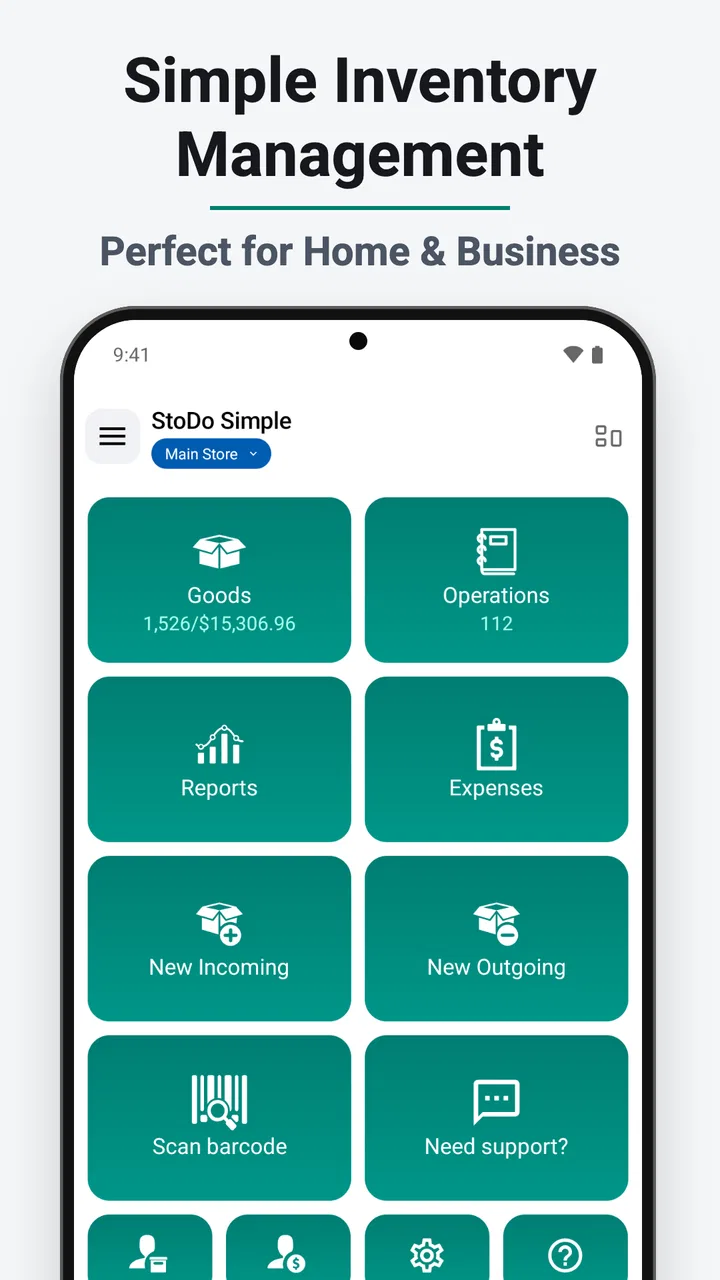
Stock & Inventory Simple:StoDo gives that situation a single place to start. Instead of trying to remember the quantity of every item, I can create a record for each product and adjust it as stock changes. The value is not in making inventory sound complicated. It is in reducing the number of small decisions needed to keep a count current.
That simplicity is also the first important trade-off. Someone who only needs a list of belongings may find a business-oriented inventory tool more structured than a notes app. On the other hand, a shop that needs taxes, customer accounts, barcode-heavy checkout, purchasing automation, or detailed financial reporting will probably outgrow it. I see this app sitting between a spreadsheet and a larger commercial system.
Setting up the first items
I would begin with the items that matter most rather than attempting to catalogue an entire room in one sitting. Adding products gradually makes the initial setup less tiring and gives the records a chance to match the way the stock is actually handled. A small retailer could start with fast-moving products, while a household user could begin with supplies that are expensive, frequently replaced, or easy to forget.
The practical insight here is to choose a naming pattern before entering many records. “Black cable,” “Cable black,” and “USB cable black” may all look understandable at first, but inconsistent names make later searches and handoffs less reliable. A short, repeatable format for product name, size, colour, or model is more valuable than adding decorative detail that nobody will use.
Once the basic records exist, the app becomes a running log rather than a one-time list. Incoming goods can be reflected in the quantity, and outgoing goods can be deducted when sold, used, damaged, or handed to someone else. That distinction matters: stock does not disappear only through sales. If I use shop supplies for packaging or take a component for a repair, the inventory should change too.
A realistic day-to-day workflow
Imagine a small shop receiving a delivery in the morning. I would check the boxes against the items already recorded, update the quantities, and place the goods in their normal storage locations. The app does not remove the need to inspect the delivery, but it gives me a clear place to record the result. If something arrives short or damaged, I can leave the physical issue for the supplier conversation while keeping the usable stock count honest.
During the day, the workflow changes from receiving to issuing. When a product leaves the shelf, I reduce its quantity. If several units go out together, entering the movement in one deliberate action is less error-prone than making a series of rushed changes. I would also avoid waiting until the end of the week to update everything. Delayed entry creates a tempting gap between what the app says and what is physically present.
For a home example, I might use it for renovation materials. At the beginning, I record boxes, fittings, and spare parts. When a task uses some of them, I update the relevant item immediately or at the end of that work session. The result is modest but useful: before buying more, I can check what remains instead of opening every cupboard or relying on memory.
The strongest workflow is “change the record at the moment ownership or quantity changes.” That habit is more important than any individual screen. If the app is opened only for occasional stocktaking, it can still help, but it will behave more like a periodic count sheet than a live inventory tool.
Making the count trustworthy
Inventory accuracy depends on small routines. I would perform an initial physical count rather than assuming that an old spreadsheet or memory is correct. After that, I would use occasional spot checks on the items that move most often. A full count can be tiring, whereas checking a few high-turnover products can reveal whether the process is drifting.
One non-obvious use is treating unusual movements as their own category in my working routine, even if the app is only holding the stock record. For example, I would distinguish between a sale, personal use, damage, sample, and transfer when making notes around the workflow. That makes later investigation easier because a low quantity has a possible explanation instead of looking like a mysterious mistake.
Another useful approach is to keep the app’s records aligned with physical storage. If identical products are spread across several rooms or shelves, one total quantity may hide a location problem. I would either consolidate the stock or adopt a naming convention that includes the location. This is especially helpful for home storage, where the same item can exist in a kitchen drawer, a garage box, and a workshop cabinet.
Passing inventory between people
The handoff is where many simple inventory systems become unreliable. One person receives goods, another sells them, and a third person checks the shelves. If each person updates the record differently, the app cannot compensate for unclear responsibility. Before sharing the process, I would agree on who records incoming stock, who records outgoing stock, and when a correction is allowed.
For a small team, the app is most useful when the handoff is short and explicit. The person unpacking a delivery should finish the receiving step before passing the goods onward. The person taking stock to another room or work area should communicate that movement rather than assuming someone else will notice. Even a quick spoken confirmation can prevent two people from counting the same items or neither person recording them.
This is also where I would be cautious about treating the app as a multi-user operations platform. A simple inventory record can support a small, disciplined workflow, but it does not automatically create accountability. If a business needs a detailed audit trail showing exactly who changed every quantity and why, a more specialized system may be a better fit.
For a single owner, the handoff is usually between the physical world and the phone. I receive a box, put it away, then update the record. That is easier than coordinating several employees, but it still benefits from a fixed order. If I update first and discover damaged goods later, I may accidentally count items that were never available for sale.
What the final result looks like
After a consistent period of use, the main result is confidence during ordinary decisions. I can check whether an item is available before promising it to a customer, decide whether a household purchase is necessary, and notice when a product is approaching a low level. The app does not make those decisions for me; it makes the underlying count easier to consult.
That makes it particularly suitable for owners who currently use paper lists or a general notes application. Compared with paper, it is easier to revise without rewriting the entire list. Compared with a notes app, it gives the stock record a clearer purpose and encourages quantities to be treated as changing values. Compared with a spreadsheet, it can feel less intimidating for someone who does not want to design formulas, columns, and templates.
The spreadsheet comparison is not entirely one-sided. A spreadsheet offers more freedom for calculations, custom reports, supplier analysis, and historical comparisons. If I already have a carefully maintained workbook and enjoy controlling its structure, moving to this app may not improve every part of the process. The advantage here is reduced setup and a more focused inventory task, not unlimited flexibility.
The free price lowers the barrier to trying it, which is important for a small shop or personal project with a limited budget. There are in-app purchases ranging from $0.99 to $149.99 per item, so I would check the purchase options carefully before building a workflow around anything beyond the basic experience. The app can be sampled without committing to a paid system, but “free” should not be interpreted as meaning that every possible capability is included at no cost.
Where the workflow becomes uncomfortable
The first likely friction is data entry. Simple inventory management still requires products to be entered accurately and movements to be recorded consistently. If a business has a large catalogue, many variations, or constant transactions, the initial workload may feel heavy. The app is most comfortable when the list is manageable and the user is willing to maintain it.
The second issue is the danger of false precision. A neat quantity on a screen can look authoritative even when the physical count is wrong. Shrinkage, damaged goods, forgotten transfers, and unrecorded personal use all create gaps. I would never use the app as a reason to stop checking the real shelves. Its result is only as dependable as the last honest update.
There is also a boundary between stock control and business management. A shop that needs integrated checkout, accounting, purchase orders, customer history, employee permissions, or advanced warehouse movement may need a dedicated platform. Using a simple inventory app for those jobs could lead to duplicate entry and more manual reconciliation. In that situation, a larger system with inventory built into the sales process would be the better choice, even if it takes longer to learn.
Users who dislike structured lists may also prefer a general notes app for a very small collection. If I only need to remember a handful of household items and rarely change their quantities, a note may be quicker. The point at which this app becomes worthwhile is when stock changes often enough that memory and free-form notes start causing missed purchases or awkward surprises.
Who should give it a try
I would recommend it to a small retailer, market seller, workshop owner, home organiser, or independent operator who needs a focused stock record without immediately adopting a complex business suite. It is also a reasonable starting point for someone moving away from paper and wanting a dedicated place for quantities.
I would be more cautious recommending it to a growing company with several staff members, multiple sales channels, or strict reporting requirements. Such a business should test the handoff process before relying on it. The question is not simply whether the app can hold the items; it is whether the team can keep every movement synchronized without creating a second administrative burden.
Device compatibility is approachable for older phones because the minimum operating system is Android 7.0. That makes it accessible to people who are not using a recent handset, although the day-to-day comfort will still depend on the device’s screen and performance. The Everyone age rating also fits its practical, non-specialist presentation.
My recommendation after following the whole process
Stock & Inventory Simple:StoDo works best when I treat it as a dependable working register: receive goods, update the quantity, hand them over carefully, record what leaves, and verify the shelves from time to time. Its strength is the narrowness of that job. It does not ask a small operator to build a miniature enterprise system before seeing any benefit.
My advice is to start with a limited group of important items, establish consistent names, and decide who owns each update before expanding. That approach exposes the real friction early. If the workflow remains comfortable, the app can become a useful daily habit. If the business immediately needs deep reporting, automated sales links, or detailed staff accountability, it is better to move toward a specialist system rather than forcing this one beyond its natural role.
For the right user, the outcome is simple but meaningful: fewer guesses, fewer forgotten purchases, and a clearer answer when someone asks what is actually available. I would choose it over paper or an unstructured note for a small, changing inventory, while keeping expectations realistic about manual upkeep. It is a practical first step for stock control, not a complete back office.
FAQs for Stock & Inventory Simple:StoDo
01What is Stock & Inventory Simple: StoDo used for?
Stock & Inventory Simple: StoDo is designed to help small businesses, shops, warehouses, and independent sellers track products, quantities, prices, and stock movements from a mobile device. It can be useful for monitoring incoming and outgoing items, checking current inventory, and organizing product information without relying on complicated enterprise software or a constant desktop computer connection.
02Is Stock & Inventory Simple: StoDo suitable for a small business or personal inventory?
Yes, the app is primarily suited to users who need a straightforward inventory tool rather than a large, highly customized management system. It may work well for home businesses, market vendors, small retail operations, workshops, and personal collections. Before downloading, users should still review the available storage, reporting, user-account, and product-limit features to confirm that they match the scale of their inventory.
03Can I use Stock & Inventory Simple: StoDo without an internet connection?
The app is intended to support practical inventory work on a mobile device, which can be convenient when checking products in a stockroom, shop, or location with unreliable connectivity. However, offline behavior can depend on the specific version and feature being used. Users should verify whether data entry, synchronization, backups, and multi-device access require an internet connection before relying on it for daily operations.
04Does Stock & Inventory Simple: StoDo support barcode scanning and stock updates?
Barcode scanning and quick stock adjustments are important features for many inventory users, especially when receiving deliveries or recording sales. StoDo may provide tools that simplify product identification and quantity changes, but the exact scanning method and supported device capabilities can vary. Check the current app listing and in-app settings to confirm compatibility with your phone camera, barcode format, and workflow.
05Is my inventory data safe, and can I back it up or export it?
Because inventory records can include product costs, prices, supplier details, and sales information, backup options should be considered before entering important data. Review whether Stock & Inventory Simple: StoDo offers cloud synchronization, local backups, export formats, or account-based recovery. It is also wise to read the privacy policy and test restoring or exporting a small sample before using the app as your only inventory record.
Pros
- Quick stock updates make everyday inventory tracking simple.
- Barcode scanning helps reduce manual entry errors.
- Useful low-stock alerts help prevent unexpected shortages.
- Supports multiple product categories and storage locations.
- Lightweight design works well on older Android devices.
Cons
- Advanced reporting options may be limited for larger businesses.
- Initial product setup can take time for extensive inventories.
- Some features may require a paid upgrade or subscription.
- Cloud synchronization options may not meet every business need.
- The interface may feel basic compared with full warehouse systems.

Stock & Inventory Simple:StoDo
Gallery